
Free
Hides videos by word and by channel, plus Hide Shorts.
US$0forever
No account or card.
Keeps working after the free trial ends.
Install freeWord and channel hiding and Hide Shorts are free with no time limit. The rest of the feed stays.
One set of rules checks the information YouTube provides on the home feed, search, the sidebar, the player's own suggestions and autoplay. Word and channel hiding and Hide Shorts are free with no time limit; the 16 ready-made subjects come with the subscription.
Each setting changes in FeedTamer on the left, and YouTube on the right follows.
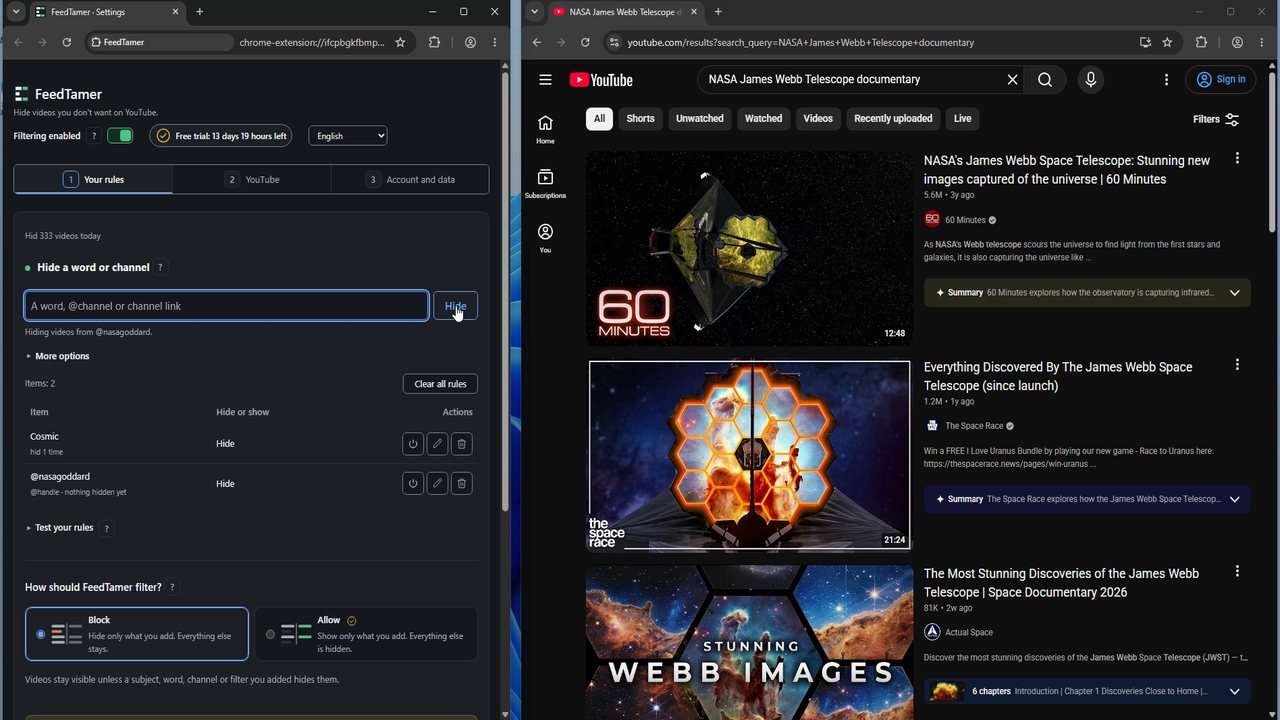
Illustrative demo. On YouTube, FeedTamer hides items without adding buttons, labels, or hints.
Hiding videos by word and by channel, and Hide Shorts, are free with no time limit.
Keeps working after the free trial ends.
Sixteen ready-made subjects turn on with one tap.
With the subscription, Allow mode hides every video that no Show rule keeps.
Start with one word you keep seeing in unwanted video titles.
Setting it up for a young kid? See FeedTamer for parents.
Install FeedTamer from Chrome Web Store in a compatible desktop browser. Click the FeedTamer icon on the toolbar to open Settings.
The Settings screen has one box for this. It accepts a title word, an @handle or a channel link, and the Hide button saves the rule. Each saved rule shows how many videos it has hidden.
With filtering on, videos with that word in the title are hidden. A rule that hides more than intended can be removed from the same list.
Filter home, search, and watch recommendations, including supported player suggestions. YouTube Premium is not required.
Make all rule changes in Settings. Click the FeedTamer icon on the toolbar when you need it; FeedTamer adds no controls to YouTube.
Hide videos whose titles match words you add. With the subscription, Allow mode hides every video that no Show rule keeps.
Hide videos from channels you choose. With the subscription, a Show rule keeps a channel visible even when a section or subject would hide it.
Sixteen ready-made subjects, among them politics, gambling, drama and graphic violence, turn on with one tap. Section switches hide mixes, news shelves, playables and other sections. Subjects and section switches come with the subscription.
Shorts hiding is on by default. Turn it off if you still watch them. Search and subscriptions keep working either way.
Learn how to block keywords, when a channel rule fits better, and what a filter cannot detect.
Your YouTube feed and watch activity are processed locally. They are not uploaded to FeedTamer.
FeedTamer contacts thefeedtamer.com to confirm a new trial offer, check paid licenses and, if you save one, back up your settings. That copy is kept while any paid plan is active and for 7 days after it ends, then deleted. Those requests do not include watch history, video titles, or search queries. If Chrome sync is on, Chrome also copies your rules to your other signed-in devices.
The free version hides videos by word and by channel and includes Hide Shorts, with no time limit. The subscription adds the 16 ready-made subjects, Show rules and Allow mode, recommendation and section switches, live, duration and watched-video filters, the Shouty titles filter, privacy controls and a manual cloud backup of your settings. The free trial includes every feature except the cloud backup. The cloud backup comes with a paid plan.
Hides videos by word and by channel, plus Hide Shorts.
No account or card.
Keeps working after the free trial ends.
Install freeEvery filter, including the 16 ready-made subjects and Allow mode, plus a manual save and restore of your lists in FeedTamer cloud storage.
Billed monthly.
Renews monthly until you cancel.
Every filter, including the 16 ready-made subjects and Allow mode, plus a manual save and restore of your lists in FeedTamer cloud storage.
Billed yearly.
Renews yearly until you cancel.
The free trial and a paid plan both include every filtering feature except that cloud settings backup requires a paid plan. That includes subjects, Show rules and recommendation switches. Filtering happens in your browser.
Each plan covers the whole household: the people who live in your home, on the household's personal computers.
Without a plan, word and channel hiding and Hide Shorts keep working, and those rules can still be added and removed. The other settings stay saved and return when a plan is active. You can view and export saved settings with or without a plan. Saving the cloud copy requires an active paid plan. The copy is kept for 7 days after access ends, then deleted, and restoring it stays available during those 7 days.
Each subscription renews at the end of its month or year until canceled. Canceling stops the next renewal; access continues through your paid period. After that, the free features keep working.
Prices are in US dollars. Paddle calculates and adds applicable taxes at checkout.
Your order reference is below. The license field is in FeedTamer Settings > Account and data: paste the reference there and select Activate. Keep the reference for later use.
How FeedTamer actually behaves.
FeedTamer hides videos that match your rules. With the subscription, Settings also has switches for home page recommendations, related videos next to the player and suggestions when a video ends.
No. Feed contents and watch activity stay in the browser. Trial offers, paid license checks and, if you save one, a settings copy use thefeedtamer.com. Those requests do not include watch history.
To read titles and channels on the page so matching cards can be hidden. It does not run on other sites.
New installs can start a free trial of every filtering feature, with no account or card. The cloud settings backup comes with a paid plan. Current free trial length: 14 days. The trial starts only when you choose Start free trial in Settings and needs an internet connection to confirm the offer. Existing trial expiry dates do not change when the offer changes. When the trial ends without a plan, word and channel hiding and Hide Shorts keep working. Subjects and the other subscription features pause until a plan is active, and their settings stay saved. You can view and export saved settings at any time.
YouTube changes can affect filtering. We publish compatibility updates. If a rule stops working, contact support with the page type and what happened; do not send your license key.
You can cancel at any time. Cancel a monthly or annual subscription in the Paddle customer portal before its next renewal. Access stays through the period you already paid, and the free features keep working after it.
Listed prices do not include local tax. Sales tax, VAT, or GST is calculated at checkout by Paddle, the merchant of record.
YouTube's "Don't recommend channel" helps tune your recommendations. FeedTamer applies explicit rules locally to visible content on supported pages. You can combine allowed lists, title words and section controls in Settings. If YouTube's own controls meet your needs, you may not need an extension.